How to proofread text in any app with one hotkey
Select the text, press the AI Shortcuts hotkey (Ctrl+Space on Windows and Linux, ⌥+Space on macOS) and choose Proofread. The AI returns a corrected version with the list of fixes, with no copy-paste into a chat tab.
Step by step
- 1
Select the text
Highlight the text you want to check in any app: an email, a document, a chat box or a web form.
- 2
Press the hotkey
Press Ctrl+Space (Windows and Linux) or Option+Space (macOS). The command popup opens next to your cursor.
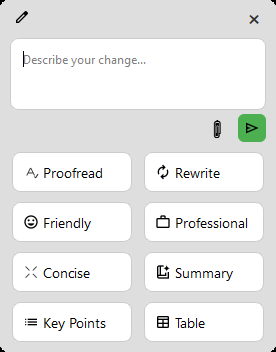
Press the hotkey and pick a command - 3
Choose Proofread
Click Proofread. The result opens in a response window.
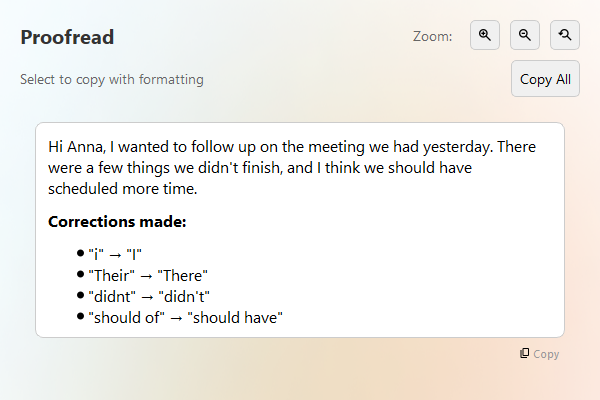
Read the corrected text and the list of fixes - 4
Use the result
Copy the corrected text back, or keep chatting to ask for a different tone or an explanation.
Hi Anna, i wanted to follow up on the meeting we had yesterday. Their were a few things we didnt finish, and I think we should of scheduled more time. Can you send me the slides befor friday so I can review them?
Hi Anna, I wanted to follow up on the meeting we had yesterday. There were a few things we didn't finish, and I think we should have scheduled more time. Can you send me the slides before Friday so I can review them?

Corrections made:
- "i" → "I"
- "Their" → "There"
- "didnt" → "didn't"
- "should of" → "should have"
- "befor" → "before"
- "friday" → "Friday"
Mình muốn xin nghỉ phép ngày mai vì có việc gia đình đột suất. Mong anh chị thông cảm giúp đở, mình sẽ bàn giao công việc đầy đủ trước khi nghĩ.
Mình muốn xin nghỉ phép ngày mai vì có việc gia đình đột xuất. Mong anh chị thông cảm giúp đỡ, mình sẽ bàn giao công việc đầy đủ trước khi nghỉ.
Tips
- Works in any app where you can select text, because AI Shortcuts reads your selection and does not depend on a plugin.
- Proofread keeps your meaning. If you want a rewrite, use Rewrite, Concise or Professional instead.
- Other languages work too: the model corrects text in the language you wrote. See the Vietnamese example below.
FAQ
Does Proofread work in every app?
It works in any app where you can select text and copy it. Some apps that block copying or simulated keystrokes may not work.
Is my text sent anywhere?
Only to the AI provider you configure, and only when you run a command. There is no telemetry.
Can I use it for free?
Yes. The app is free and open source. Google Gemini has a free tier, and local models through Ollama cost nothing.
Download AI Shortcuts
Free and open source for Windows, macOS and Linux.