How to summarize a web page, document or YouTube video
Select all the text (Ctrl+A, or ⌘+A on macOS), press the hotkey and choose Summary, Key Points or Table. For a YouTube video, open Show transcript, copy it, then run the command on the pasted text.
Step by step
- 1
Select the content
Press Ctrl+A (Cmd+A on macOS) on an article, PDF or document. Select only the part you need if it is very long.
- 2
Press the hotkey and choose a command
Choose Summary for a short paragraph, Key Points for a list, or Table to turn data into a Markdown table.
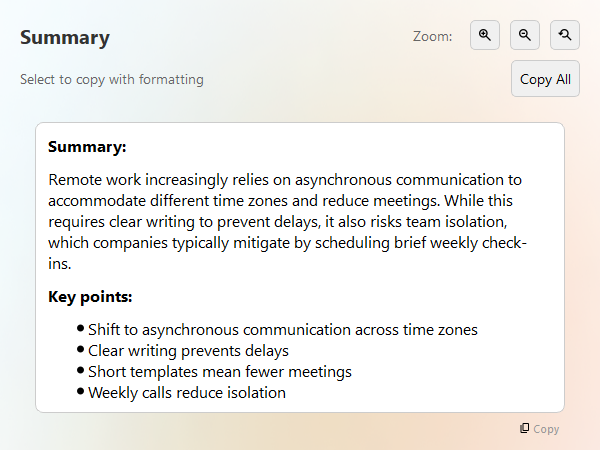
A summary and key points in the response window - 3
For YouTube
Open the video, click Show transcript, copy the transcript, paste it into any text field, select it and run the command.
- 4
Follow up
Ask more in the response window, for example “what are the risks?” or “translate to Vietnamese”.
Remote work has changed how teams collaborate. Many companies now rely on asynchronous communication, where people share updates in writing instead of holding meetings. This reduces interruptions and lets colleagues in different time zones contribute without staying up late. However, it also demands clearer writing: vague messages cause delays because the reader has to ask follow-up questions and wait for answers. Teams that adopt short written templates for status updates, decisions and requests report fewer meetings and faster decisions. The main risk is isolation, so many teams still schedule a short weekly call to keep personal contact.
Summary
Remote work increasingly relies on asynchronous communication to accommodate different time zones and reduce meetings. While this requires clear writing to prevent delays—often achieved through structured templates—it also risks team isolation, which companies typically mitigate by scheduling brief weekly check-ins.
Key Points
- Shift to asynchronous communication: many remote teams use written updates instead of meetings to collaborate across time zones without interruptions.
- Need for clear writing: vague messages cause delays and unnecessary follow-up questions.
- Benefits of templates: short written templates for updates, decisions and requests lead to fewer meetings and faster decisions.
- Risk of isolation: a primary risk of remote work.
- Mitigation: many teams keep a brief weekly call for personal contact.
Tips
- Very long inputs may exceed a model’s limit. Summarize chapters or sections one at a time.
- Use Table when the text contains comparable items such as prices, dates or features.
- Keep sensitive documents local: pick Ollama or another local model so nothing leaves your computer.
FAQ
Can it summarize a video directly?
It works on text. Copy the video transcript from YouTube and run Summary or Key Points on it.
Does it work with PDFs?
Select and copy the text from your PDF reader, then run the command. You can also attach a text file in the response window.
Is there a length limit?
The limit depends on the model you use. Split very long texts into sections.
Download AI Shortcuts
Free and open source for Windows, macOS and Linux.