AI writing assistant hotkey for Windows: use AI in any app
Install AI Shortcuts, add an API key for the AI provider you prefer, then select text in any Windows app and press Ctrl+Space. A command popup opens next to your cursor, and the result replaces your selection or opens in a response window.
Step by step
- 1
Download and run AI Shortcuts
Get the Windows build from the website or GitHub Releases (Windows 10 or later, 64-bit). If SmartScreen warns you, choose More info, then Run anyway, because the binary is not code-signed yet.
- 2
Add an AI provider
Open Settings, then AI Providers, pick a provider such as Google Gemini, paste your API key and save. Local models through Ollama need no key.
- 3
Select text and press Ctrl+Space
In an email, a document, a browser or a chat box, highlight text and press Ctrl+Space. The command popup opens.
- 4
Pick a command
Choose Proofread, Rewrite, Friendly, Professional, Concise, Summary, Key Points, Table or one of your own commands.
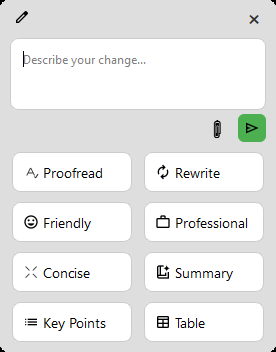
Press Ctrl+Space and pick a command
Hi Anna, i wanted to follow up on the meeting we had yesterday. Their were a few things we didnt finish, and I think we should of scheduled more time. Can you send me the slides befor friday so I can review them?
Hi Anna, I wanted to follow up on the meeting we had yesterday. There were a few things we didn't finish, and I think we should have scheduled more time. Can you send me the slides before Friday so I can review them?

Corrections made:
- "i" → "I"
- "Their" → "There"
- "didnt" → "didn't"
- "should of" → "should have"
- "befor" → "before"
- "friday" → "Friday"
Tips
- It works across apps because it reads your current selection, so it does not need a plugin for each program.
- Pick a different provider or model per command in Settings if you want a cheaper model for simple fixes.
- On Linux the same flow uses an X11 session. On macOS the hotkey is Option+Space.
FAQ
Is there a free AI writing assistant for Windows?
Yes. AI Shortcuts is free and open source. You pay only the AI provider you choose; Google Gemini has a free tier and local models through Ollama cost nothing.
Which hotkey does it use?
Ctrl+Space on Windows and Linux, and Option+Space on macOS.
Does it send my text anywhere?
Only to the AI provider you configure, and only when you run a command. There is no telemetry.
Download AI Shortcuts
Free and open source for Windows, macOS and Linux.